← Home
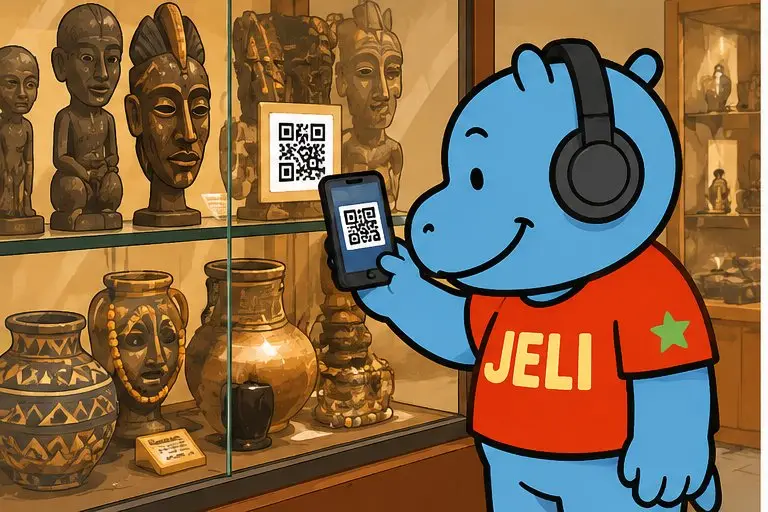
Malini, wearing headphones, scans the QR code on a museum display case
Museum managers

Your museum speaks every language.

Permanent collections, rooms, objects, tours: a QR code opens a JeliCard that guides visitors, tells the story of each object and gives all the practical information.

  • Museums
  • Heritage sites
  • Cultural centres
  • Monuments
  • Interpretation centres

1The problem: visitors who walk past without understanding

The objects are precious, but their story often stays silent for those who don't read the panels.

Panels too shortThere's no way to explain everything on a label or a room panel.
All kinds of visitorsSchool groups, families, tourists: each has their own language and level.
Costly audio guidesBuying, maintaining, charging, lending: a heavy cost for a museum.
Little follow-upVisitors leave and you lose touch.

2A JeliCard for every need

Swipe to see the examples.

Welcome

Planning the visit

Opening hours, prices, map, access, visitor rules, a welcome voice message.
Objects

The story of each piece

Audio commentary in several languages, close-up photos, the object's origin.

Tours

Themed tours

A children's tour, a discovery tour, an in-depth tour.

Schools

For teachers

Teaching sheets and activities, as links to open before the visit.

Calendar

Museum life

Temporary exhibitions, talks, workshops, museum night.

3What Jèli gives you

A free audio guideVisitors use their own phone, with no device to lend.
Every languageThe commentary by voice in each language: French, national languages, English. The text translates with one tap.
Accessible to allAudio helps visitors who are visually impaired or who don't read.
Editable at any timeAn object on loan, a room closed: you correct the JeliCard.
Visitors who come backPeople who opened your JeliCards in the Jèli app are notified of your new events.
Free and ad-freeVisitors see only your museum.

Your JeliCards travel around the world

A JeliCard is shared in one move: by text message, on social media, by email, on the internet, or simply by scanning the QR code from one phone to another. Your message travels across time and distance, and reaches every audience, here and elsewhere.

  • SMS
  • WhatsApp
  • Social media
  • Email
  • Internet
  • Scan from phone to phone

?What about Instagram, TikTok, WhatsApp?

These tools are excellent, and you probably use them already. Jèli does not replace them: it does a different job.

Instagram and TikTok The networks that help people discover you
Ideal for
showing your news in photos and videos, and reaching new audiences.
Information
lives in a feed: new posts push the old ones down.
Access
mostly needs the app and an account; the algorithm decides who sees what.
Around it
other content and ads are shown too.
WhatsApp The messaging app that gets people talking
Ideal for
everyday conversations, answering questions, running a group.
Information
lives in a conversation: messages pile up and old ones are quickly lost.
Access
means having your number or being in the group.
Around it
are all the person's other conversations.
Jèli The reference page, in the right place
Ideal for
information that must stay available, attached to an object, a poster or a place.
Information
lives on a stable page: always in the same place, always up to date.
Access
takes a simple scan, with no account and no app.
Around it
no ads and no one else's content: only your message and your other JeliCards.

Social media makes people want to come. Once in the rooms, visitors need something else: the commentary on the object in front of them. With Jèli, they scan the label and listen, with no account and no searching.

It's not one or the other. Put the links to your Instagram, TikTok and WhatsApp accounts in the text of your JeliCard, and share your JeliCard on your networks: each tool does what it does best.

4How to do it

Start with one room or with the ten highlight objects.

  1. Choose the highlight objects and your visitors' languages.
  2. Write a short, lively commentary for each object.
  3. Record the voice messages with a curator, a guide or a storyteller.
  4. Create the JeliCards with photos, links and practical information.
  5. Print the QR codes on the labels and at the entrance, with “Scan to listen”.
  6. Train the welcome team to show how to scan.
  7. Expand gradually to the other rooms.

5Obstacles, and how to get past them

Not everyone has a smartphoneA relative, a seller or a community relay can scan and play it for them. The printed material still makes sense on its own.
Costly data, weak networkShort voice messages, light images, no app to download: the JeliCard opens fast, even with little data.
Few people know QR codesAdd the words “Scan to listen” and show the gesture once: after that, everyone knows how.
No signal in the roomsCheck the coverage, or offer the Wi-Fi at reception.
Scientific accuracyHave the commentaries checked by a curator or a historian.
Sound disturbs other visitorsEncourage the use of earphones, or offer the text as well as the voice message.

Our tips

  • Place a large welcome QR code at the entrance and the ticket desk.
  • Have a griot or a storyteller tell the story of the objects: the visit comes alive.
  • Offer a special tour for children.
  • Announce your events on the JeliCards to bring visitors back.
  • Don't forget your business card: your name and a QR code that leads to all your activities.
The display case protects the object. The JeliCard gives it back its voice, in each visitor's language.
Back to the home page

Make your QR codes talk.

Your first JeliCard is ready in a few minutes.

App Store Google Play