← Home
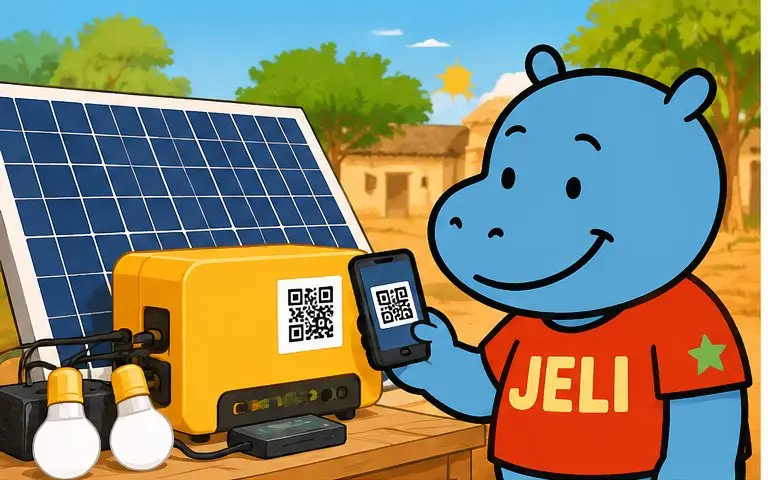
Malini scans the QR code stuck on a solar kit
Instruction manuals

A manual that shows and explains.

Household appliance, solar kit, motorbike, pump, tool, cleaning products, cosmetics, medicines, fertiliser: all everyday products, at home and outdoors. A QR code on the product or its packaging opens a JeliCard with the instruction manual in video, pictures and voice, in each person's language. And if you rent something out, the JeliCard explains to the renter how everything works.

  • Manufacturers
  • Importers
  • Distributors
  • Installers
  • Repairers
  • Farm input suppliers
  • Cosmetics labs and brands
  • Anyone who rents something out: equipment, vehicles, machines, housing

1The problem: a manual nobody reads

The paper manual is often long, in small print, in a foreign language, and it gets lost before the first breakdown.

Foreign languageMany manuals are in English or Chinese, rarely in national languages.
Too much textA diagram and ten pages can't replace a demonstration.
Manual lostThe box is thrown away with the manual inside; at the first breakdown, there's nothing left.
MisuseA badly installed appliance or a wrongly dosed product means a breakdown, an accident or an unhappy person.

2What the JeliCard can hold

Swipe to see the examples.

Get started

Setup

A short video of the installation and first use, step by step.

Use

The right way to do it

Settings, doses, safety instructions, with a voice message for each language.

Maintain

Making the product last

Cleaning, parts to replace, maintenance schedule.

Rental

For the renter

How the rented machines and items work, rules of use, deposit, who to call if something goes wrong.

Troubleshoot

If something goes wrong

The most common faults and how to fix them, in pictures.

Contact

After-sales and warranty

Approved repairers, the after-sales number to tap and call, warranty terms, a link to the official PDF manual.

3What Jèli gives you

Understood by everyoneThe instruction manual can be heard in each person's language: one voice message per language.
Show rather than writeA 30-second video explains better than ten pages.
Never lostThe QR code is on the product: the manual is always at hand.
Always up to dateA new instruction or a troubleshooting tip is added to the JeliCard, without reprinting.
Fewer after-sales callsCommon questions find their answer on the JeliCard.
Free and ad-freeThe person who scans sees only your product, not a competitor's.

Your JeliCards travel around the world

A JeliCard is shared in one move: by text message, on social media, by email, on the internet, or simply by scanning the QR code from one phone to another. Your message travels across time and distance, and reaches every audience, here and elsewhere.

  • SMS
  • WhatsApp
  • Social media
  • Email
  • Internet
  • Scan from phone to phone

?What about Instagram, TikTok, WhatsApp?

These tools are excellent, and you probably use them already. Jèli does not replace them: it does a different job.

Instagram and TikTok The networks that help people discover you
Ideal for
showing your news in photos and videos, and reaching new audiences.
Information
lives in a feed: new posts push the old ones down.
Access
mostly needs the app and an account; the algorithm decides who sees what.
Around it
other content and ads are shown too.
WhatsApp The messaging app that gets people talking
Ideal for
everyday conversations, answering questions, running a group.
Information
lives in a conversation: messages pile up and old ones are quickly lost.
Access
means having your number or being in the group.
Around it
are all the person's other conversations.
Jèli The reference page, in the right place
Ideal for
information that must stay available, attached to an object, a poster or a place.
Information
lives on a stable page: always in the same place, always up to date.
Access
takes a simple scan, with no account and no app.
Around it
no ads and no one else's content: only your message and your other JeliCards.

There are plenty of tutorials on TikTok and tips in WhatsApp groups, but not always for your exact model, and not always correct. With Jèli, the QR code stuck on the product opens the official instruction manual for that model directly, approved by you.

It's not one or the other. Put the links to your Instagram, TikTok and WhatsApp accounts in the text of your JeliCard, and share your JeliCard on your networks: each tool does what it does best.

4How to do it

Start with your best-selling product.

  1. Identify the most frequent questions and mistakes around your product.
  2. Film short videos: installation, use, maintenance.
  3. Record the instructions by voice, in the languages of the people who use your products.
  4. Create one JeliCard per product model.
  5. Stick the QR code on the product itself, not just on the box.
  6. Train your sellers and installers to show it with every sale.
  7. Add new faults and tips reported from the field.

5Obstacles, and how to get past them

Not everyone has a smartphoneA relative, a seller or a community relay can scan and play it for them. The printed material still makes sense on its own.
Costly data, weak networkShort voice messages, light images, no app to download: the JeliCard opens fast, even with little data.
Few people know QR codesAdd the words “Scan to listen” and show the gesture once: after that, everyone knows how.
Making videos is expensiveA phone is enough: simple, well-lit 30-second videos.
Liability for mistakesHave your technicians approve the content, and put the link to the official PDF manual on the JeliCard.
The QR code gets damagedChoose a tough sticker, placed away from wear and heat.

Our tips

  • Place the QR code on the appliance, somewhere visible and durable.
  • Keep videos short and light for slow connections.
  • For hazardous products (fertilisers, pesticides, chemicals), put the safety instructions first.
  • Keep the paper manual for legal requirements, and put the link to its PDF version on the JeliCard.
  • Don't forget your business card: your name and a QR code that leads to all your activities.
The paper manual ends up in the bin with the box. The JeliCard stays stuck to the product, and it speaks.
Back to the home page

Make your QR codes talk.

Your first JeliCard is ready in a few minutes.

App Store Google Play