← Home
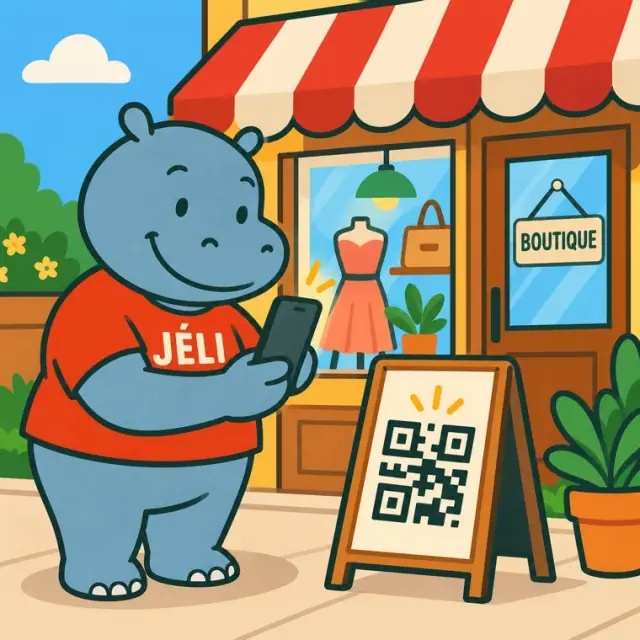
Malini scans a shop's QR code
Product sellers

Your products speak for themselves.

Producer, craftsperson, food processor, shopkeeper or online seller: a QR code on the packaging, the label, the stall or the shop window opens your product's JeliCard, with your voice, your prices and your contact for orders.

  • Producers
  • Craftspeople
  • Food processors
  • Shopkeepers
  • Online shops
  • Cooperatives
  • Markets and fairs
  • … and anyone who has something to sell

1The problem: a label too small to convince

People look at a product for a few seconds. The label can't say everything, and once they are home, they no longer know where to buy it again.

Little spaceOrigin, ingredients and how to use it don't fit on the label.
Prices that changeOne new price or one new product and the labels must be redone.
Contact lostAfter buying, people can't find your number to order again.
TrustPeople want to know who makes it and how.

2What the JeliCard can hold

Swipe to see the examples.

Product

The product sheet

Photos, origin, ingredients or materials, weight, storage, how to use it.
You

Who makes it

Your story, your workshop or your field, a voice message in your languages.

Catalogue

The whole range and the prices

Your other products, sorted in the same folder: sizes, prices, current offers.

Order

Buying made easy

Your WhatsApp link and your number, written in the text: one tap is enough to order. Payment, delivery, where to buy.

Reviews

What people say

Recipes, photos and voice messages from happy people, which you add.

3What Jèli gives you

A label with no limitsEverything you want to say about the product, in text, photos and voice.
Prices always up to dateYou change a price on the JeliCard; the printed QR code stays the same.
People come back to youThe person scans the packaging again and finds your contact to reorder. People who opened the JeliCard in the Jèli app are notified of your new JeliCards.
In everyone's languageA voice message to present the product to those who don't read French.
No app neededA simple scan with the phone's camera.
Free and ad-freeThe person who scans sees only your products, not your competitors'.

Your JeliCards travel around the world

A JeliCard is shared in one move: by text message, on social media, by email, on the internet, or simply by scanning the QR code from one phone to another. Your message travels across time and distance, and reaches every audience, here and elsewhere.

  • SMS
  • WhatsApp
  • Social media
  • Email
  • Internet
  • Scan from phone to phone

?What about Instagram, TikTok, WhatsApp?

These tools are excellent, and you probably use them already. Jèli does not replace them: it does a different job.

Instagram and TikTok The networks that help people discover you
Ideal for
showing your news in photos and videos, and reaching new audiences.
Information
lives in a feed: new posts push the old ones down.
Access
mostly needs the app and an account; the algorithm decides who sees what.
Around it
other content and ads are shown too.
WhatsApp The messaging app that gets people talking
Ideal for
everyday conversations, answering questions, running a group.
Information
lives in a conversation: messages pile up and old ones are quickly lost.
Access
means having your number or being in the group.
Around it
are all the person's other conversations.
Jèli The reference page, in the right place
Ideal for
information that must stay available, attached to an object, a poster or a place.
Information
lives on a stable page: always in the same place, always up to date.
Access
takes a simple scan, with no account and no app.
Around it
no ads and no one else's content: only your message and your other JeliCards.

Instagram and TikTok help people discover your products, and WhatsApp is for taking orders. Jèli is on the product itself: the person holding your jar, your bag or your fabric scans it and finds the product sheet, the prices and your contact to reorder, even if they don't follow you on social media.

It's not one or the other. Put the links to your Instagram, TikTok and WhatsApp accounts in the text of your JeliCard, and share your JeliCard on your networks: each tool does what it does best.

4How to do it

Start with your best-selling product.

  1. Create the product's JeliCard with photos and a description.
  2. Record a voice message presenting it.
  3. Add your prices, your other products and your WhatsApp link for orders.
  4. Print the QR code on the label, the packaging, the bag or the stall.
  5. Display a large QR code on your stand or your shop window.
  6. Share the JeliCard on WhatsApp and your networks.
  7. Update prices and new products.

5Obstacles, and how to get past them

Not everyone has a smartphoneA relative, a seller or a community relay can scan and play it for them. The printed material still makes sense on its own.
Costly data, weak networkShort voice messages, light images, no app to download: the JeliCard opens fast, even with little data.
Few people know QR codesAdd the words “Scan to listen” and show the gesture once: after that, everyone knows how.
My prices change oftenThat's exactly the point: you edit the JeliCard and the label stays the same.
No time to do everythingStart with your best-selling product, then add the others little by little.
Afraid of being copiedShow only what you want: the JeliCard presents your product, not your trade secrets.

Our tips

  • Add the words “Scan to discover and order”.
  • Show what happens behind the scenes: the production line, the workshop or the field, your partners. Give your products life and meaning through your JeliCards: that's what builds trust and makes people want to come back.
  • One JeliCard per product, or a single one for the whole catalogue, depending on your range.
  • Also put the QR code on your invoices, your bags and all your communication materials.
  • Don't forget your business card: your name and a QR code that leads to your whole catalogue.
The label gives the product's name. The JeliCard tells its story and makes people want to come back.
Back to the home page

Make your QR codes talk.

Your first JeliCard is ready in a few minutes.

App Store Google Play